Notebook
How to Apply Amazon Bedrock Guardrails to Only Part of an Input
This note explains how to limit the scope of Amazon Bedrock Guardrails to part of an input text by using InvokeModel input tags and Converse guardContent blocks.
Guide
Contents
When using Bedrock Guardrails, you may want to inspect only user input, but system-side instructions or trusted context can also become part of the evaluation target.
The trigger for this note was an issue I hit while using Claude Code Action through Bedrock. An account-level Guardrails configuration was applied to system-side instructions, and part of the system prompt was treated as prompt injection.
In that environment, selective_content_guarding.system was set to comprehensive, so not only user input but also the system prompt context was broadly evaluated. As a result, Claude Code Action could barely run.
While investigating the issue, I found that it can be avoided by making the Guardrails scope selective and explicitly marking the part of the user prompt that should be evaluated.
In a real application, a single prompt often contains several kinds of text.
- System-side instructions
- Trusted context retrieved by RAG or tool execution
- Previous conversation history
- The current user input
Sometimes you only want Guardrails to evaluate the current user input.
In Bedrock, the way to specify that scope differs by API.
| API | How to specify the guarded scope |
|---|---|
InvokeModel | Use <amazon-bedrock-guardrails-guardContent_xxx> input tags |
Converse | Use a guardContent block in message content |
InvokeModel and InvokeModelWithResponseStream support XML-style input tags. Converse does not use XML tags, and instead uses the guardContent field.
The official documentation covers this behavior here.
Prerequisites
This example uses a Bedrock API key and sends it as Authorization: Bearer $AWS_BEARER_TOKEN_BEDROCK.
export AWS_REGION=us-east-1
export MODEL_ID='us.anthropic.claude-haiku-4-5-20251001-v1:0'
export GUARDRAIL_ID='xxxxxxxx'
export GUARDRAIL_VERSION='DRAFT'
export AWS_BEARER_TOKEN_BEDROCK='your-api-key-here'Set GUARDRAIL_ID to the ID of an existing Bedrock Guardrails resource.
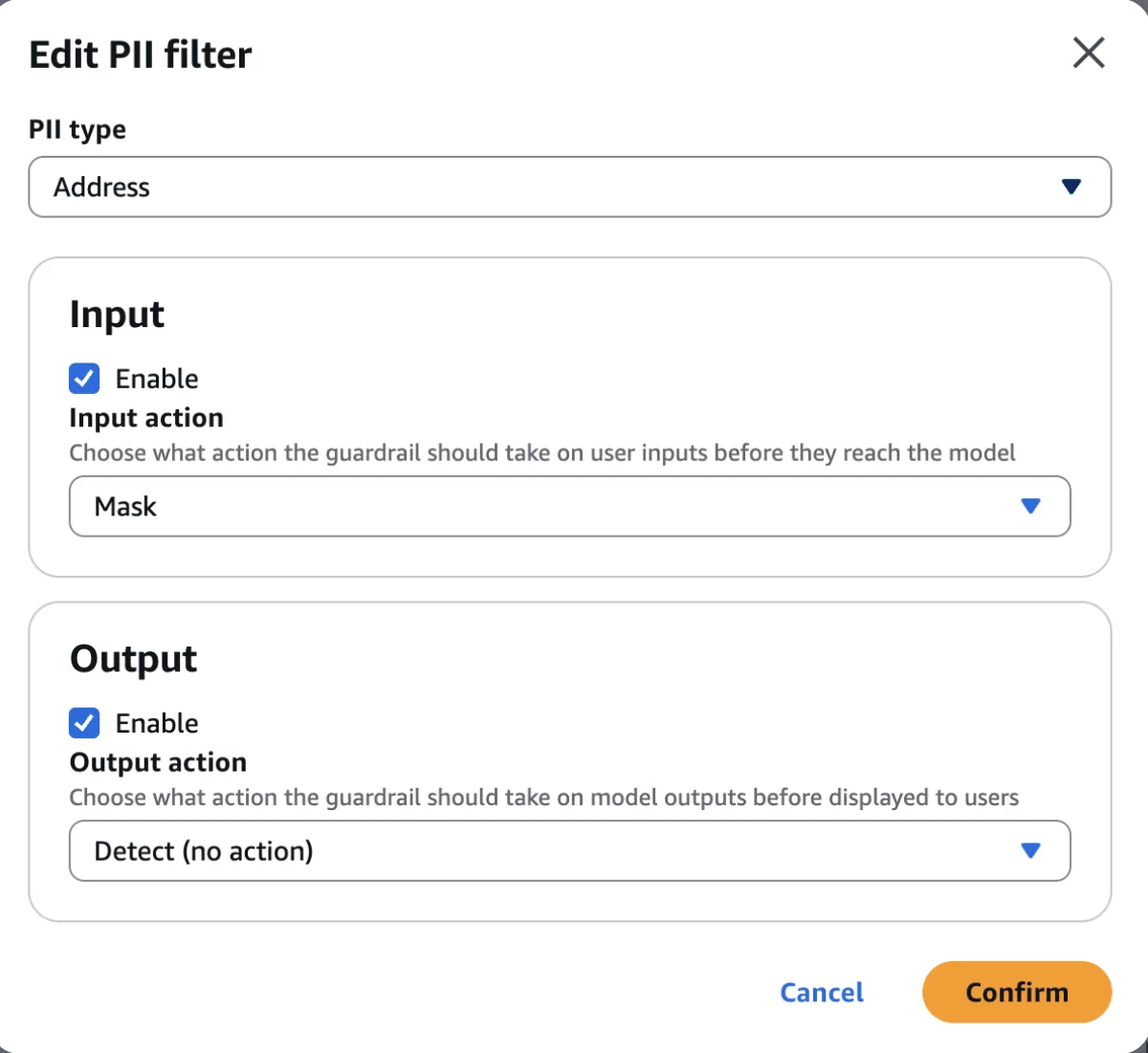
In this example, the guardrail detects PII such as addresses and names.
I configured the guardrail to detect addresses as PII, with Mask for input and Detect for output.
Guard Only Part of the Input with InvokeModel
With InvokeModel, wrap the text you want to evaluate with <amazon-bedrock-guardrails-guardContent_${TAG_SUFFIX}>.
Then set the same suffix in amazon-bedrock-guardrailConfig.tagSuffix in the request body.
TAG_SUFFIX="$(openssl rand -hex 6)"

curl -s "https://bedrock-runtime.${AWS_REGION}.amazonaws.com/model/${MODEL_ID}/invoke" \
  -H "Authorization: Bearer ${AWS_BEARER_TOKEN_BEDROCK}" \
  -H "Content-Type: application/json" \
  -H "Accept: application/json" \
  -H "X-Amzn-Bedrock-GuardrailIdentifier: ${GUARDRAIL_ID}" \
  -H "X-Amzn-Bedrock-GuardrailVersion: ${GUARDRAIL_VERSION}" \
  -H "X-Amzn-Bedrock-Trace: ENABLED" \
  --data-binary @- <<EOF
{
  "anthropic_version": "bedrock-2023-05-31",
  "max_tokens": 512,
  "messages": [
    {
      "role": "user",
      "content": [
        {
          "type": "text",
          "text": "My company address is 1-1 Chiyoda, Chiyoda-ku, Tokyo. Please respond politely to the customer.\\nHere is the user's question.\\n\\n<amazon-bedrock-guardrails-guardContent_${TAG_SUFFIX}>I live at 2-8-1 Nishi-Shinjuku, Shinjuku-ku, Tokyo. Please tell me your company address and how to get there from my home.</amazon-bedrock-guardrails-guardContent_${TAG_SUFFIX}>"
        }
      ]
    }
  ],
  "amazon-bedrock-guardrailConfig": {
    "tagSuffix": "${TAG_SUFFIX}"
  }
}
EOFIn this example, only the text wrapped by the tag is evaluated by Guardrails:
I live at 2-8-1 Nishi-Shinjuku, Shinjuku-ku, Tokyo. Please tell me your company address and how to get there from my home.InvokeModel Result
With this configuration, the address inside the tagged user input was anonymized as {ADDRESS}.
In the response text, the model interprets {ADDRESS} as a missing address, which shows that the input-side address was masked before being passed to the model.
{
  "content": [
    {
      "type": "text",
      "text": "# Thank you for your inquiry.\n\nOur company address is as follows:\n\n**1-1 Chiyoda, Chiyoda-ku, Tokyo, Japan**\n\nHowever, I apologize, but I'm unable to provide specific directions from your location since the address you mentioned appears to be incomplete in the information available to me."
    }
  ],
  "amazon-bedrock-guardrailAction": "INTERVENED"
}In the Guardrails trace, the address inside the tag is marked as ANONYMIZED on the input side.
{
  "amazon-bedrock-trace": {
    "guardrail": {
      "input": {
        "<guardrail-id>": {
          "sensitiveInformationPolicy": {
            "piiEntities": [
              {
                "type": "ADDRESS",
                "match": "2-8-1 Nishi-Shinjuku, Shinjuku-ku, Tokyo",
                "action": "ANONYMIZED",
                "detected": true
              }
            ]
          },
          "invocationMetrics": {
            "guardrailCoverage": {
              "textCharacters": {
                "guarded": 122,
                "total": 247
              }
            }
          }
        }
      },
      "outputs": [
        {
          "<guardrail-id>": {
            "sensitiveInformationPolicy": {
              "piiEntities": [
                {
                  "type": "ADDRESS",
                  "match": "1-1 Chiyoda, Chiyoda-ku, Tokyo, Japan",
                  "action": "NONE",
                  "detected": true
                }
              ]
            }
          }
        }
      ],
      "actionReason": "Guardrail masked.\nNo action."
    }
  }
}The company address outside the tag, 1-1 Chiyoda, Chiyoda-ku, Tokyo, was not ANONYMIZED on the input side. Only the user input wrapped by amazon-bedrock-guardrails-guardContent was masked.
The guardrailCoverage.textCharacters values also show that only part of the input, not the whole input, was evaluated by Guardrails.
On the output side, the company address in the model response is detected, but because the output action is Detect, the action is NONE.
tagSuffix must be 1 to 20 alphanumeric characters.
Using a fixed value can make the tag structure easier for a user to guess and abuse in prompt injection, so AWS recommends using a random value for each request.
If you want to evaluate multiple sections, you can use the same suffix multiple times.
Nested tags are not supported.
<amazon-bedrock-guardrails-guardContent_${TAG_SUFFIX}>
First guarded section
</amazon-bedrock-guardrails-guardContent_${TAG_SUFFIX}>

Unguarded context

<amazon-bedrock-guardrails-guardContent_${TAG_SUFFIX}>
Second guarded section
</amazon-bedrock-guardrails-guardContent_${TAG_SUFFIX}>Guard Only Part of the Input with Converse
With Converse, use a guardContent block instead of XML input tags.
curl -s "https://bedrock-runtime.${AWS_REGION}.amazonaws.com/model/${MODEL_ID}/converse" \
  -H "Authorization: Bearer ${AWS_BEARER_TOKEN_BEDROCK}" \
  -H "Content-Type: application/json" \
  -H "Accept: application/json" \
  --data-binary @- <<EOF
{
  "guardrailConfig": {
    "guardrailIdentifier": "${GUARDRAIL_ID}",
    "guardrailVersion": "${GUARDRAIL_VERSION}",
    "trace": "enabled"
  },
  "inferenceConfig": {
    "maxTokens": 512
  },
  "messages": [
    {
      "role": "user",
      "content": [
        {
          "text": "My company address is 1-1 Chiyoda, Chiyoda-ku, Tokyo. Please respond politely to the customer.\\nHere is the user's question."
        },
        {
          "guardContent": {
            "text": {
              "text": "I live at 2-8-1 Nishi-Shinjuku, Shinjuku-ku, Tokyo. Please tell me your company address and how to get there from my home."
            }
          }
        }
      ]
    }
  ]
}
EOFIn Converse, set the Guardrails ID and version in guardrailConfig, and put the content you want to evaluate inside guardContent.
When a guardContent block exists in messages, Guardrails evaluates the content inside that block.
Here, the company address in the normal text block is outside the evaluation scope, and only the user input is placed in guardContent.
Converse Result
With this configuration, the address inside guardContent was also anonymized as {ADDRESS}.
{
  "output": {
    "message": {
      "content": [
        {
          "text": "# Thank you for your inquiry.\n\nOur company address is as follows:\n\n**1-1 Chiyoda, Chiyoda-ku, Tokyo**\n\nUnfortunately, I am unable to provide specific directions from your home to our office, as the address field in your message appears to be incomplete or wasn't filled in properly."
        }
      ],
      "role": "assistant"
    }
  },
  "stopReason": "end_turn"
}In trace.guardrail.inputAssessment, the address in the guardContent user input is marked as ANONYMIZED.
{
  "trace": {
    "guardrail": {
      "actionReason": "Guardrail masked.\nNo action.",
      "inputAssessment": {
        "<guardrail-id>": {
          "sensitiveInformationPolicy": {
            "piiEntities": [
              {
                "type": "ADDRESS",
                "match": "2-8-1 Nishi-Shinjuku, Shinjuku-ku, Tokyo",
                "action": "ANONYMIZED",
                "detected": true
              }
            ]
          },
          "invocationMetrics": {
            "guardrailCoverage": {
              "textCharacters": {
                "guarded": 122,
                "total": 245
              }
            }
          }
        }
      }
    }
  }
}On the output side, the company address is detected, but because the output action is Detect, the action is NONE.
{
  "trace": {
    "guardrail": {
      "outputAssessments": {
        "<guardrail-id>": [
          {
            "sensitiveInformationPolicy": {
              "piiEntities": [
                {
                  "type": "ADDRESS",
                  "match": "1-1 Chiyoda, Chiyoda-ku, Tokyo",
                  "action": "NONE",
                  "detected": true
                }
              ]
            }
          }
        ]
      }
    }
  }
}With Converse as well, the company address in the normal text block was not anonymized on the input side. Only the user input inside guardContent was masked.
Because this example uses Mask-based anonymization, stopReason is end_turn, not guardrail_intervened, and the model response is still returned.
Summary
Bedrock Guardrails lets you specify which part of an input message should be evaluated by the guardrail.
The way to specify the scope depends on the API.
InvokeModeluses<amazon-bedrock-guardrails-guardContent_${TAG_SUFFIX}>input tagsConverseuses aguardContentblock in message contenttagSuffixshould be a random value for each request
If you evaluate system-side instructions and trusted context together with user input, Guardrails can intervene in places you did not intend.
By explicitly marking only user input as the evaluation target, you can keep the necessary protection while making model calls easier to run reliably.
Related notes
Read next
Using Amazon Bedrock and Bedrock Guardrails with Mastra
This note explains how to call Amazon Bedrock models and Bedrock Guardrails from Mastra.
Read more
Using Mastra Agent Approval to Require Human Confirmation Before Tool Execution
This note shows how to use Mastra Agent Approval from a Hono API, letting read-only tools run automatically while requiring approval for side-effect tools such as sending email.
Read more
Fixing a Promptfoo result collision bug with duplicate provider ids
I fixed a Promptfoo bug where evaluation results collided and were displayed incorrectly when multiple providers used the same provider id.
Read more